
The MA-Connect app is:
The MA-Connect app lets you interact with new Maidaid Evo and Elite commercial warewashers directly from your smartphone. It allows you to detect and troubleshoot alarms, update the gateway firmware, access the user manual, view electricity, water, detergent and rinse-aid consumption, consult usage statistics, monitor power status, and see which programmes are running along with their temperatures.
Before you start
- Your machine needs to be switched on and showing the clock
- Bluetooth and Wi-Fi are turned on for your smartphone
- You have a secure Wi-Fi network nearby (one with a password)
IMPORTANT – The machine can only connect to a secure Wi-Fi network. It cannot use an open or guest network.
Where to download it:
- iOS (iPhone/iPad): Search “MA-Connect” on the Apple App Store (It requires iOS 13.0 or later) or use this link
- Android: Search “MA-Connect” on Google Play or use this link
General setup process:
1. Turn on WIFI on the machine
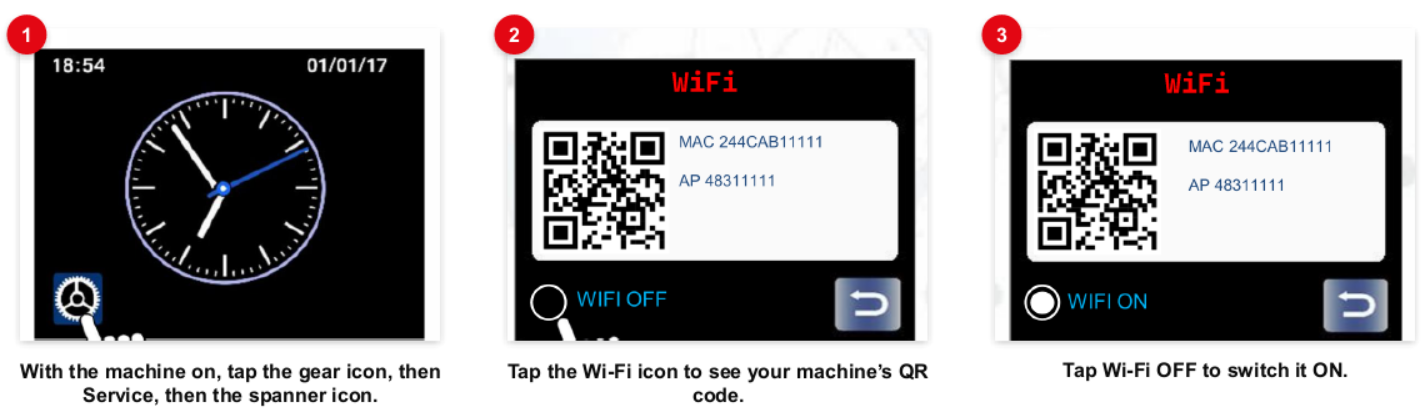
2. Add your machine
Link the machine to your phone
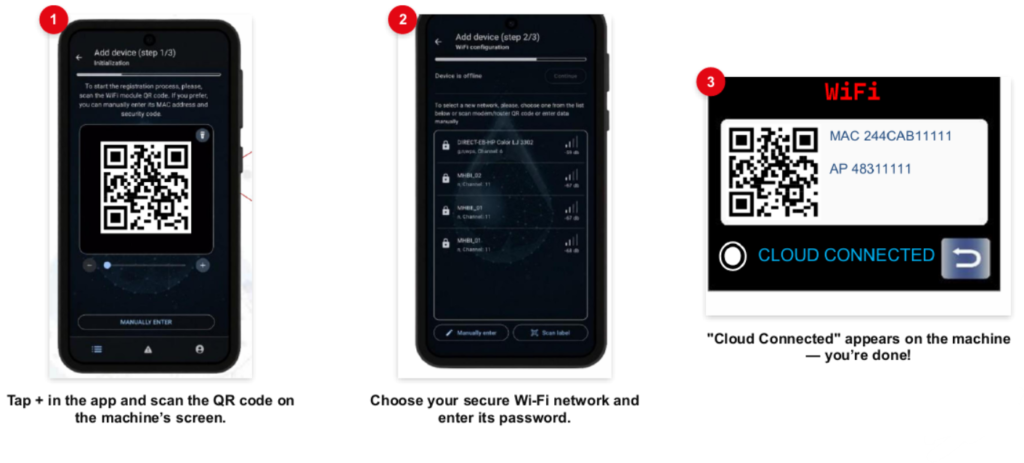
3. You’re all set! Now you can:
Check live status – See running programmes and temperatures in real time.
- Check live status – See running programmes and temperatures in real time
- Get alerted – Know straight away if there’s a fault
- Review usage – Look back at consumption and usage stats
Engineer Resources: